Best AI Mini PCs and Developer Kits for Local AI in 2026
Local AI hardware is moving fast. A year ago, most people experimenting with language models, computer vision, and automation workflows needed either a cloud GPU account or a full desktop tower. In 2026, the buying decision is more interesting: mini PCs now ship with AI-ready CPUs and NPUs, NVIDIA edge kits are easier to buy, and compact AI desktops are starting to target developers who want serious local inference without building a workstation from scratch.
This guide is a practical starting point for choosing between an AI mini PC, a personal AI desktop, and an edge AI developer kit. The right choice depends less on the marketing label and more on the workload: are you running local LLMs, building robotics or camera projects, replacing a desktop, or learning edge inference on a budget?
For the current RIOWARE shortlist, see the curated Power & Electronics picks here: RIOWARE Power & Electronics.
Quick comparison
| Hardware path | Best for | Watch before buying |
|---|---|---|
| AI mini PC | Desk productivity, light local AI, compact Windows/Linux workloads | RAM ceiling, storage, thermals, NPU/software support |
| Personal AI desktop | Heavier local AI inference, developer workstations, model experimentation | Price, memory capacity, GPU ecosystem, availability |
| NVIDIA DGX Spark / GB10 systems | Maximum compact AI compute, research, heavy local model training and inference | Availability, pricing, power needs, software stack requirements |
| Edge AI developer kit | Robotics, camera projects, embedded AI, computer vision | Linux image support, power supply, camera/GPIO needs |
| Single-board edge AI computer | Learning, prototyping, low-power deployments | Documentation, community support, accessory requirements |
| Portable power station | Keeping routers, desks, and maker equipment online | Watt-hours, output watts, UPS behavior, recharge time |
Best for a compact AI workstation: AI mini PC
An AI mini PC is the easiest category to understand if you want a normal computer first and AI acceleration second. These systems usually look like small desktops, run Windows or Linux, and include newer CPUs with dedicated AI acceleration hardware. They are useful for developers, creators, and home-office users who want a compact machine that can handle productivity work while also experimenting with local AI tools.
The key buying question is memory. Local AI workloads can become RAM-hungry quickly, especially if you want to run larger models, keep browser tabs open, and use development tools at the same time. Storage matters too, because model files and datasets grow quickly. If the system is sealed or hard to upgrade, buy enough RAM and SSD capacity up front.
Also check what the AI hardware actually accelerates. An NPU can be useful for supported workloads, but not every local AI framework will automatically use it. For many real-world projects, CPU performance, GPU support, RAM, thermals, and software compatibility still matter more than the phrase “AI PC” on the spec sheet.
Best for serious local AI experimentation: personal AI desktop
A personal AI desktop sits above the mini PC category. This is the path for people who care less about the smallest possible box and more about local inference performance, memory bandwidth, developer tooling, and the ability to run more demanding AI workloads without depending entirely on cloud GPUs.
This type of system can make sense for researchers, builders, and technical creators who want to test models locally, prototype agent workflows, or keep sensitive experiments on their own hardware. The tradeoff is cost. These systems can be dramatically more expensive than standard mini PCs, so the purchase should be tied to a real workflow rather than curiosity alone.
Before buying, check whether your preferred tools support the hardware. Look for operating system support, driver maturity, framework compatibility, and real-world user reports. A machine with impressive AI branding is only useful if your software stack can use it reliably.
Best for maximum compact AI compute: NVIDIA DGX Spark and GB10 systems
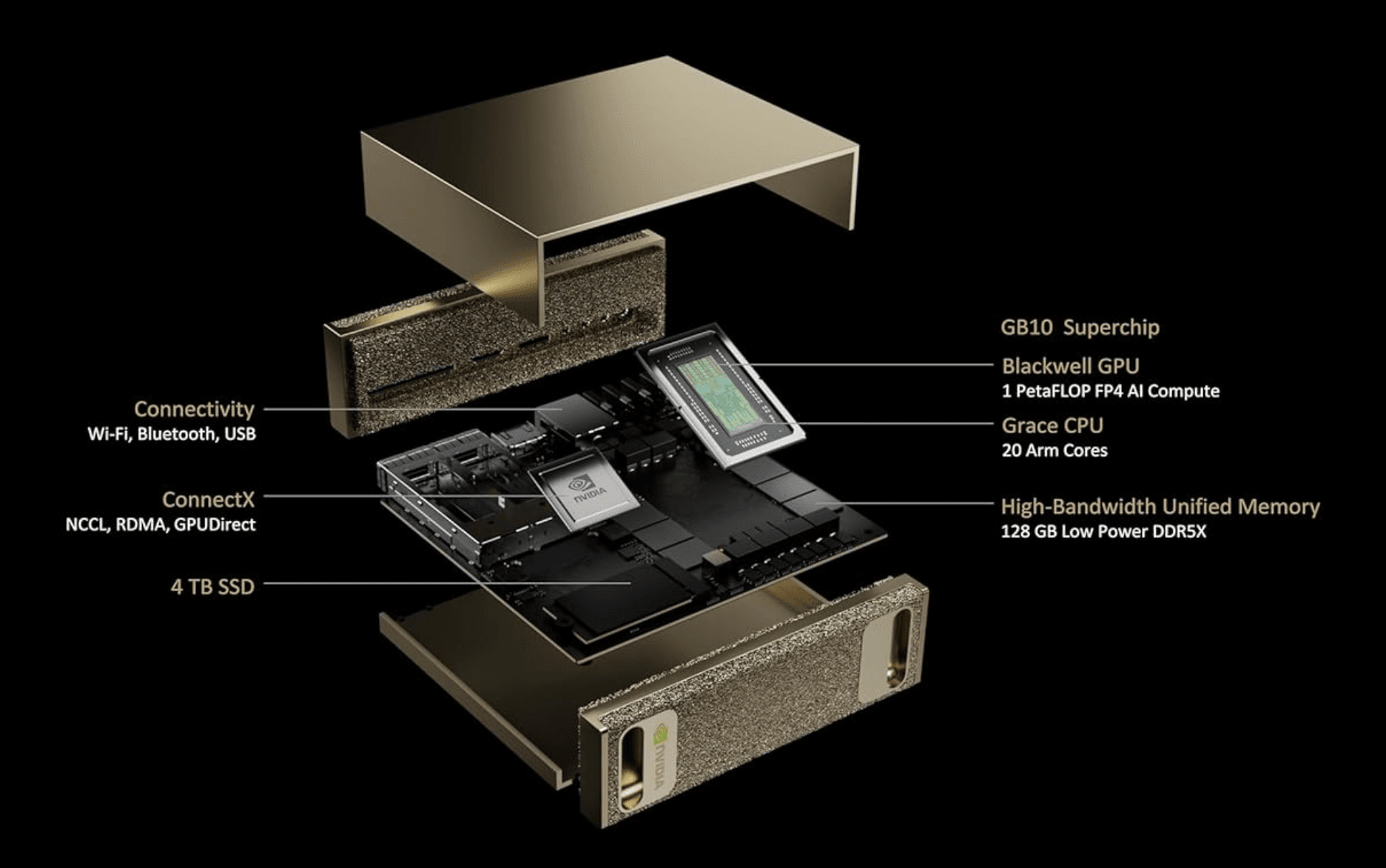
NVIDIA has introduced a new category that blurs the line between a desktop and a data center: the DGX Spark and GB10-powered systems. These are compact “AI supercomputers” designed to bring serious GPU compute to a form factor that fits on a desk, and in some cases, a shelf.
The DGX Spark is NVIDIA’s pocket-sized AI supercomputer, built around the GB10 Blackwell chip. The GB10 integrates two GPU dies with 128GB of unified memory, delivering data-center-class AI performance in a box that is a fraction of the size of a traditional rack-mounted server. For developers and researchers who need to train models, run heavy inference, or experiment with large language models locally, this represents a fundamental shift in what is possible outside a cloud environment.
What makes these systems interesting is the convergence of two trends. First, GPU compute is becoming dense enough that a single compact unit can replace a multi-GPU desktop build for many workloads. Second, the software stack around CUDA, TensorRT, and open-source frameworks has matured to the point where running these systems locally is no longer a research-only exercise.
The tradeoffs are real. Availability can be limited, pricing is premium, and power requirements are higher than a standard mini PC. These systems are not a replacement for a compact office computer—they are specialized tools for people who need maximum AI compute in the smallest possible footprint. If your workflow involves training models, running multiple large models simultaneously, or doing heavy computer vision work, a DGX Spark or GB10-based system is worth serious consideration. If you just want to run a few local LLMs and browse the web, a standard mini PC or personal AI desktop will likely serve you better at a lower cost.
For anyone in the local AI space, the DGX Spark and related GB10 systems signal that the future of personal AI compute is moving toward extreme density. The question is no longer whether you can run AI locally, but how much compute you can fit into a box that fits on your desk.
Best for robotics and cameras: edge AI developer kit
Edge AI developer kits are different from mini PCs. They are not always designed to be comfortable daily computers. Instead, they are built for projects: robotics, machine vision, smart cameras, sensors, embedded inference, and prototype devices that need AI close to the hardware.
This is where boards like NVIDIA Jetson-style kits make sense. They are excellent for learning how AI behaves when it has to interact with cameras, motors, sensors, and real physical environments. They are also useful when latency, bandwidth, or privacy make cloud processing a poor fit.
The warning is that developer kits require more setup patience. Check whether the kit includes the power supply, whether you need a microSD or NVMe drive, what camera modules are supported, and whether the Linux image and SDK match the project you want to build. If you want a plug-and-play office computer, buy a mini PC instead.
Best for learning and prototyping: affordable edge boards
Single-board edge AI computers can be a good way to learn without spending workstation money. They are useful for students, hobbyists, and builders who want to explore lightweight inference, Linux, sensors, and embedded projects.
The main risk is ecosystem maturity. A cheaper board can become expensive in time if documentation is thin, accessories are hard to source, or software images are inconsistent. Before buying, search for current setup guides, active communities, and examples that match your use case.
If the project depends on camera input, GPIO, robotics control, or always-on deployment, make sure the board has the right physical ports and enough power headroom. Edge AI is not just about TOPS numbers; it is about the whole system working reliably in the place where you plan to deploy it.
Do not forget power and backup planning
Local AI hardware, routers, workstations, and maker equipment all become more useful when the supporting power setup is stable. A portable power station or UPS-style backup can keep your router online, prevent interrupted prints, and give you time to shut systems down cleanly during short outages.
For power products, check watt-hours, continuous output watts, surge rating, recharge time, and whether the unit behaves like a true UPS for your equipment. A power station that is great for camping may not be ideal for sensitive desktop gear unless the output and switching behavior match your needs.
Buyer warnings
- Do not buy on “AI PC” branding alone. Check the CPU, GPU/NPU, RAM, storage, and software support.
- Confirm whether memory and storage are upgradeable before purchase.
- For local LLM work, memory capacity often matters more than peak marketing numbers.
- For developer kits, verify OS image support, power supply requirements, and accessory compatibility.
- For DGX Spark and GB10 systems, check availability, pricing, and power requirements before committing.
- For edge AI camera projects, confirm camera module support before buying the board.
- For power stations, confirm continuous output watts and whether UPS-style behavior is supported.
- Always verify current price, seller, shipping, and return terms on Amazon before checkout.
RIOWARE shortlist
RIOWARE keeps the quick-buy layer focused on products tied to a real workflow: compact AI compute, edge AI projects, and practical power backup. Start with the curated Power & Electronics page, then use Amazon to confirm the current buying details.
Check the current RIOWARE Power & Electronics picks
Disclosure: RIOWARE and samr.io may earn from qualifying purchases. Prices and availability can change quickly, so final price, stock, shipping, and seller details should always be confirmed on Amazon before purchase.